This guideline serves as a quick start guide for Shopify which covers all the steps that you need to take to get started with the Shopify store today. These steps will help guide you to create, open, and promote your online store within minutes. Feel free to download this guide so that you can refer to it throughout the setup process. This guide is useful to both new users on Shopify and also seasoned e-commerce businesses looking to re-platform.

Should you hire a Shopify Developer?
Shopify, like many online platforms, is a subscription-based software that allows anyone to set up an online store and sell their products easily. Shopify is very easy to use and doesn't require high technical know-how. That being said, new business owners often prefer to hire a Shopify developer to get their initial product out quickly. There are several reasons why people are willing to go for a developer.
A few being:
- Owners are not tech-savvy.
- Using developers gets the work done quickly.
- Less know-how about Shopify
- Budget considerations
In this BLOG we have tried to narrow down the entire process of setting up your e-commerce business in a very simple and lucid format.
So the answer to the question of should you hire a Shopify developer, we would say that
"You can any day go ahead and hire a developer to build your store, but as Shopify has made the entire process so user-friendly, we would recommend new business owners to give Shopify a try before hiring a developer."
In 2021, eCommerce sales are expected to account for 18.1% of retail sales worldwide.
E-commerce is slowly taking over the traditional market. Statistics show the gradual growth of e-commerce to become a more and more important part of the global economy. This has led to an exponential increase in competition.
Make your e-commerce company the next big sensation.
Owners often want to start their business as soon as possible, giving them less time to plan and execute the brand mission and vision properly. Shopify developers generally take 4-6 weeks to deliver the website to the owners. This includes project setup, website building and launching.
If all the planning and setups are laid beforehand, building a Shopify website from scratch can be a very lucrative process for business owners. With proper planning time to build the e-commerce website can be even reduced to a week.
Steps to launch your eCommerce store
- Create your Shopify account
- Select and customize the theme
- Optimize store settings
- Add products to your store
- Add apps
- Add payment gateways
- Start selling
Create your Shopify account
The start of your E-commerce journey. The control centre of your empire. Your website is where you will spend most of the time, so, let's create an account, spend some time modifying the site, and start managing your store.
Let's begin,
Visit shopify.com. You can straightaway click the "Start Free Trial" button on the top-right corner, but we recommend you to scroll through the page once to get an overview of the Shopify store. Next, enter your email address again in a new popup window, choose a password, and add your unique e-commerce store name.
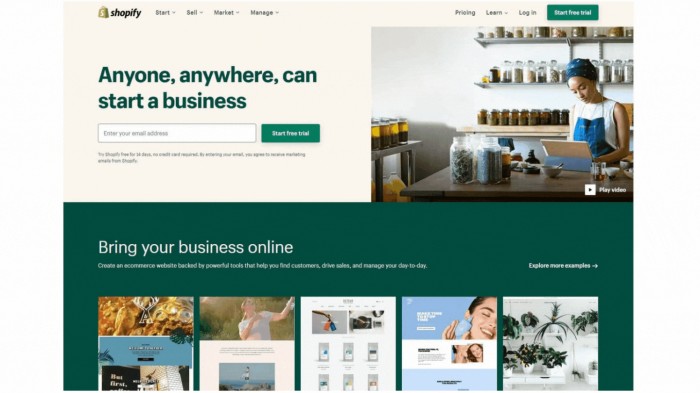
Now click on the “Create your store” button. In the next step fill in your details again, and click on the “Create account” button. A minimalist loading screen will now appear where Shopify will show you what’s happening on the backend to build your store, and after just a few seconds, your account and your store will be ready.
If you need more information read our detailed guide here.
How to use Shopify themes effectively
The next step is to choose the theme of your eCommerce store. Here again, we have two options
- Create your own theme [moderate coding skills required]
- Use pre-built custom made themes available in Shopify-themes [no coding skills required]
With lots of good features pre-built in such as quick buy, easy checkout, etc., themes now dictate the user flow by streamlining the online buy and sell process.
Pro Tip: We have listed a few to make things easier. For an exhaustive list read our blog on the Best Shopify Themes for Your Online Store.
Narrative
Designed for brand and product storytelling.

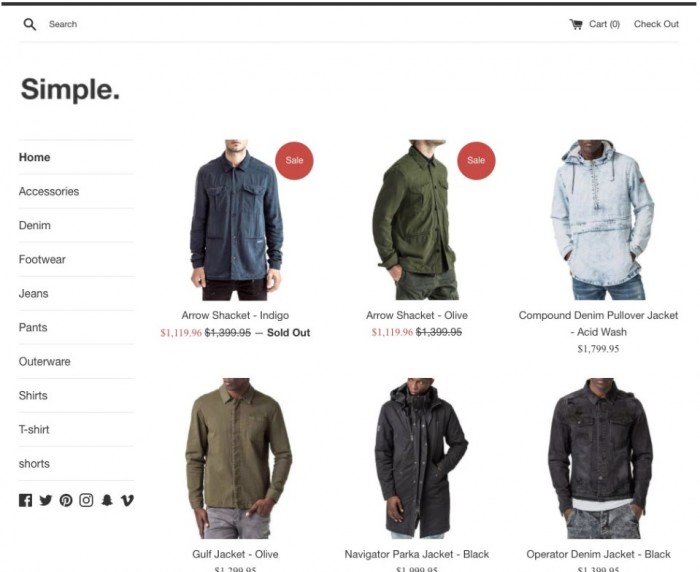
Simple
A clean and minimal theme, perfect for showcasing products.
Minimal
A simple, clean design that keeps the focus on your products.

For complete details on top free and paid themes for Shopify available read our next blog.
Apps that make users spend more.
The next step is to add a few Shopify apps which will help in overhaul the success of your online store's growth. With the right tools at your disposal, you can scale your E-commerce empire very efficiently.
These apps will help you promote your store, sell your products, reward your customers, and
handle inventory and shipping so you can earn more revenue.
Pro Tip: We have listed a few to make things easier. For an exhaustive list read our blog on the Best Shopify Themes for Your Online Store.
Abandon Aid
Follow up automatically with abandoned carts, using a friendly email and/or discount voucher. With Shopify's update last week, some of this is now included in "baseline" Shopify, so this might be redundant soon; but for now, it's a winner.
http://apps.shopify.com/abandon-aid
SEO Meta Tagger
Get more control (for non-techies) of your SEO fields.
https://apps.shopify.com/meta-tagger
FAQ, Help centre, Track order, Contact us, Multi-user WhatsApp, Live chat & Social Share
One powerful app to enable the entire support stack on your new Shopify store
https://apps.shopify.com/faqprime-lite
Product Discount
Manage discounts in bulk. Instead of manually discounting 20 products, use this App to do it in a few clicks.
https://apps.shopify.com/product-discount
Fliptabify
Hook up your Shopify store with Facebook. Good for a freebie.
https://apps.shopify.com/fliptabify
Notify
Tell customers when someone buys something in your store (“John Smith from Sydney just purchased a table”). Great for Social Proof.
https://apps.shopify.com/notify
Shortcodes
Create advanced features like Tabs, Sections that open and close (great for FAQs), Lightboxes for Size Guides and Videos, and other similar stuff.
https://apps.shopify.com/shortcodes
Flags for your currency converter
This neat little add-on does exactly what it says: adds flags to your currency converter.
http://www.shopifyninjas.com/flag-currency-converter
Payment gateways
With PayPal as a bare minimum giving the users an option of not sharing their card details and can shop hassle-free.
Which Shopify plan is best for you?
Shopify works on a monthly subscription. It takes care of all security-related stuff, hosting, payment gateway integration, and a bunch of other things you won't need to worry about if you go for a hosted service.
We really think this is a great deal, especially when you're just getting started. For $60, you can get two months or 'testing time' and see if you make some sales, and you can get a store up very quickly.
Their plans range from $30 - $180 a month, and you can check them out at www.shopify.com/pricing